MicroTelecom Service Desk

Service Desk software for the full software delivery lifecycle.

Carry a customer request from support to QA, Git-linked development, testing, release and deployment—without losing ownership, history or evidence between teams.

Role-based workflows Git and testing connections QMS-ready traceability
SupportCapture the customer need
QAConfirm, reproduce and verify
DevelopmentConnect work to Git
ReleaseTest, approve and deploy
ImproveMeasure feedback and outcomes

Help Desk vs Service Desk

Help Desk resolves the request. Service Desk carries the work through delivery.

Both products begin with organized customer support. Choose how far the work needs to continue after the initial response.

MicroTelecom Help Desk

Organize responsive customer support.

Capture questions and incidents, assign owners, manage priorities, use approved knowledge and retain a complete customer service history.

  • Email-to-ticket and customer portal
  • Assignments, priorities and escalation
  • Knowledge and customer history
  • Agent workload and service reporting
Explore Help Desk

MicroTelecom Service Desk

Continue the issue through software delivery and quality.

Keep the customer request connected as it becomes a QA ticket, development task, test result, release item and deployment record. Each team sees its own work without creating a new version of the truth.

  • Support-to-QA and development handoffs
  • Git-linked work and technical traceability
  • Automated testing, performance testing and verification
  • Release, deployment, QMS evidence and customer surveys
Start a Service Desk trial

SDLC service management

One traceable record from customer need to production.

Replace disconnected queues and status meetings with a software Service Desk that makes ownership, evidence and bottlenecks visible across the software development lifecycle.

See the production dashboards
  1. 01

    Customer intake & support triage

    Capture portal, email, chat or operator-created requests with customer history, priority and ownership already attached.

  2. 02

    QA review & reproducibility

    Classify defects, record conditions and evidence, confirm impact and move verified issues into the correct development workflow.

  3. 03

    Development & Git-linked work

    Connect the service record to code activity and development status so technical progress remains tied to the original business and customer context.

  4. 04

    Automated & performance testing

    Associate test activity, outcomes and retesting with the issue before a change is approved for release.

  5. 05

    Release management & deployment

    Coordinate approvals, release tasks, deployment work and validation without detaching the change from its supporting evidence.

  6. 06

    Customer feedback & improvement

    Close the loop with service history, customer surveys, performance reporting and the data needed to identify recurring pressure and improvement opportunities.

A real Service Desk in production

See the work, the people and the pressure behind every queue.

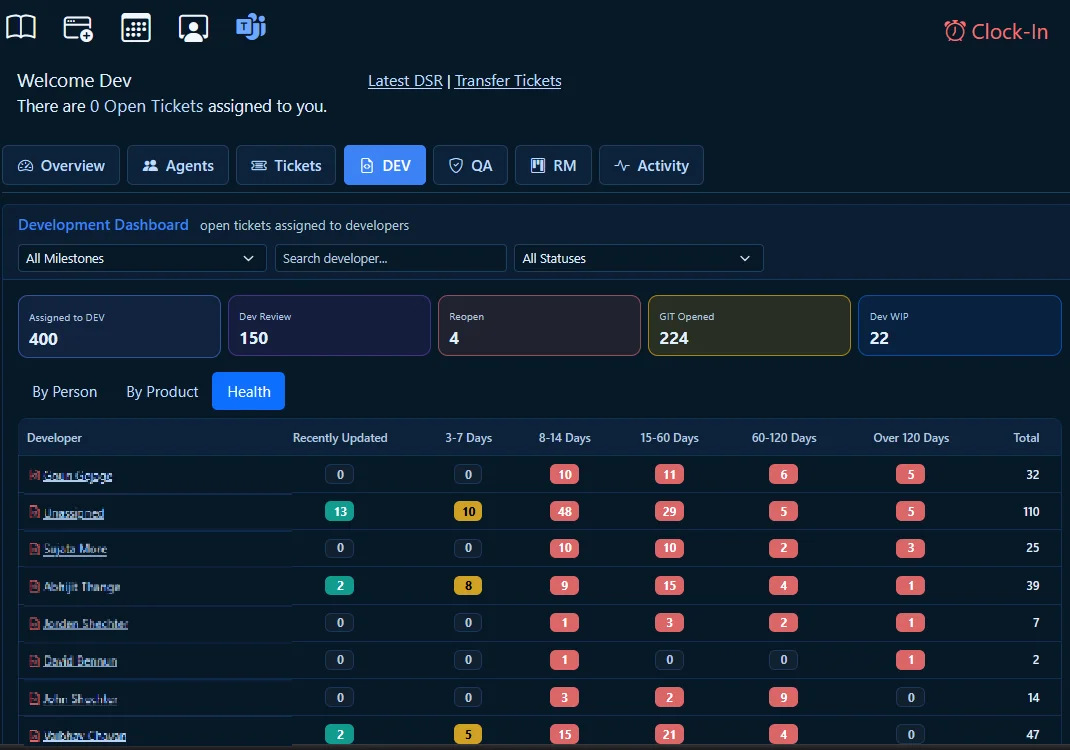
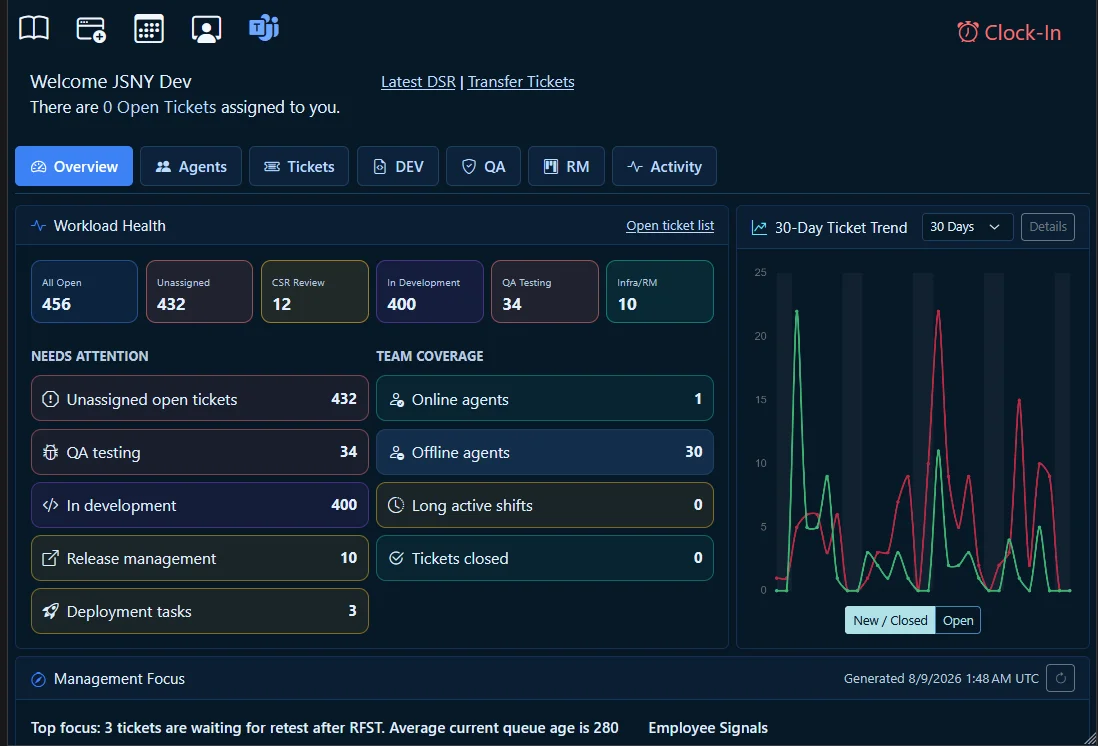
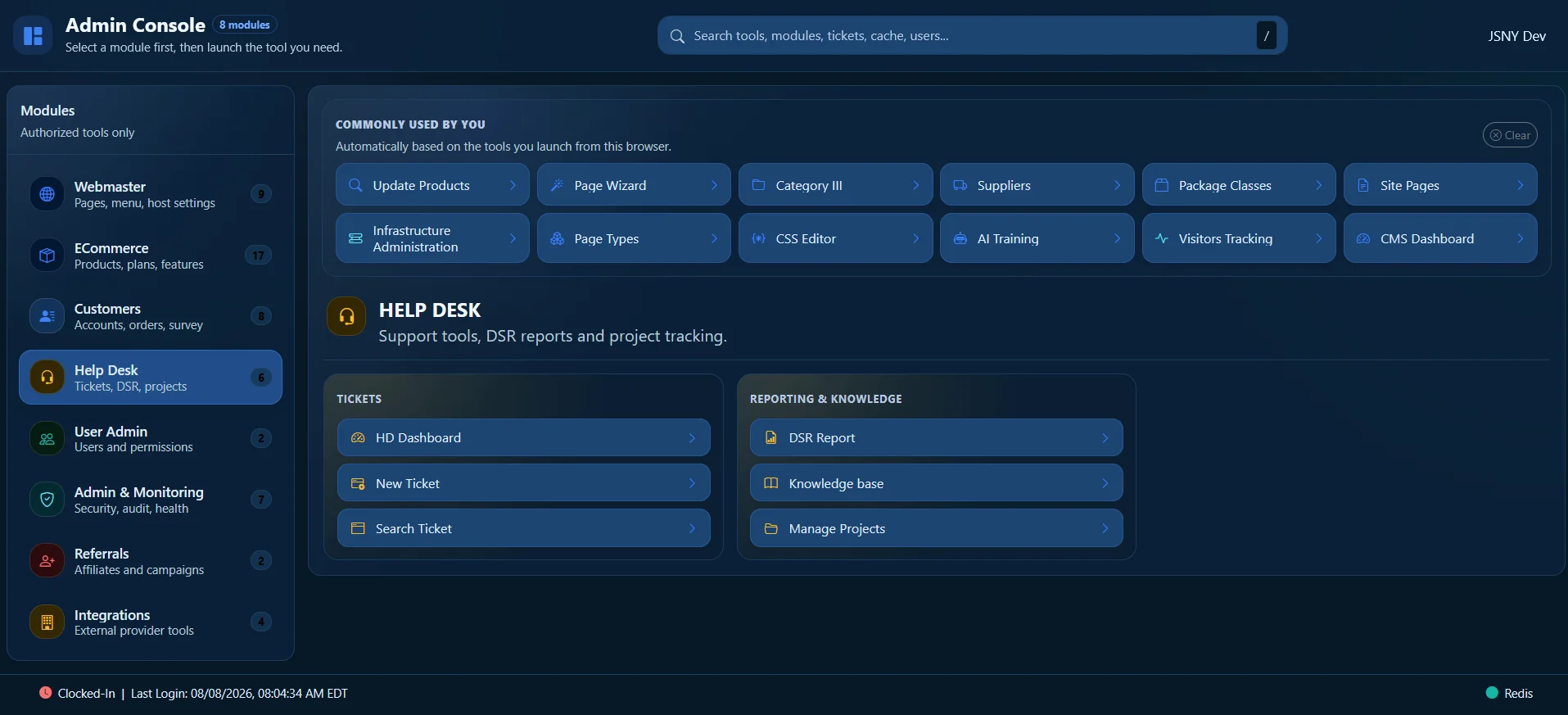
These are production views from the MicroTelecom platform—not a decorative mockup. Teams can review ownership, status, aging, workload and bottlenecks from the same operational record.

MicroTelecom Service Desk development ticket tracking dashboard showing work by product, person and department
Track work across people, products and departments. See unassigned tickets, development and QA workload, release activity, priority and issue age in one Service Desk dashboard.
MicroTelecom Service Desk operational overview showing workload health, ticket trends and management signals
Recognize bottlenecks before delivery suffers. Workload health, aging, resource signals and ticket trends give managers a practical place to focus.
MicroTelecom administration console showing role-based Service Desk tools and knowledge modules
Give each role the tools it needs. Tickets, reports, knowledge, projects, administration and monitoring are available according to user access.

Role-based Service Desk dashboards

Each team sees its work. Management sees the complete flow.

Support, QA, development, release management and administrators work from role-appropriate views while sharing the status and history needed for coordinated delivery.

Support

Own customer communication, priority, SLA and escalation while tracking progress beyond the initial response.

QA

Review evidence, reproduce defects, organize testing and confirm that fixes meet the expected result.

Development

Track assigned technical work, connect it with Git activity and expose stalled or aging issues.

Release management

Coordinate release readiness, deployment tasks, approvals and post-deployment validation.

Administration

Manage users, access, workflows, knowledge, reporting, operational monitoring and system health.

Automatic visibility into workload and bottlenecks

Review assigned and unassigned work, aging queues, response and resolution performance, agent activity and product pressure so the next management action is based on evidence.

QMS and ISO 9001 support

Turn everyday Service Desk work into retained QMS evidence.

A quality management system depends on consistent processes, responsibilities, documented information, performance evaluation and improvement. MicroTelecom Service Desk helps preserve the evidence produced as work moves from the customer through delivery.

Built from our own operating experience

MicroTelecom used this platform as the backbone for the processes and retained evidence supporting its own ISO 9001:2015 audit and certification work.

Customer interaction history

Retain requests, responses, ownership, escalation and resolution history in context.

Defect and development traceability

Follow verified issues into QA, Git-linked development, testing, release and deployment.

Knowledge and approval records

Maintain approved knowledge, guidance, accountability and the history behind controlled decisions.

Performance and improvement data

Use workload, age, response, resolution and delivery data to identify trends and improvement priorities.

Customer satisfaction surveys

Measure customer perception—not only ticket closure.

Send and retain customer surveys with the service history. Feedback provides a systematic input for customer-satisfaction monitoring, management review and continual improvement within an ISO 9001-aligned QMS.

MicroTelecom Service Desk supports QMS processes and evidence retention. It does not by itself certify an organization; certification decisions are made by independent certification bodies.

Connected Service Desk operations

Keep delivery signals close to the work they affect.

Bring communication, engineering activity, testing and operational signals into a coordinated service process instead of asking teams to reconstruct the history later.

Git integration

Connect development activity to the request so code work remains traceable to the issue and customer impact.

Testing automation

Associate automated and performance testing activity with QA review, retesting and release readiness.

Microsoft Teams

Keep coordination and operational follow-up close to the Service Desk request.

Email-to-ticket

Convert incoming email into new tickets or updates while preserving the conversation and service history.

Alerts and monitoring

Turn operational and system-monitoring signals into assigned, investigated and traceable work.

DSR, time and shifts

Record login and logout time, shift coverage, completed work and unresolved follow-up in daily service reports.

Knowledge base

Link approved internal or public guidance directly to tickets and service processes.

Coming soon

Asset management

Extend service context with managed asset information as this capability becomes available.

Service Desk software FAQ

Questions before you start.

Choose Service Desk when support work must continue through technical delivery, quality and controlled evidence—not simply close at the first response.

What is the difference between Help Desk and Service Desk?

Help Desk focuses on responsive customer support: intake, ownership, answers and resolution. MicroTelecom Service Desk adds the cross-team workflows needed to continue that request through QA, development, testing, release, deployment, feedback and improvement.

Can the Service Desk replace separate QA and development trackers?

It is designed to bring customer tickets, QA tracking, development work, testing, release and deployment tasks into one connected system. Teams can use role-specific dashboards while sharing the same traceable history.

How does Git integration help?

Git-linked activity helps connect technical change with the issue that required it. This improves visibility for support and QA, reduces context loss and strengthens traceability for review and audit evidence.

How can Service Desk software support ISO 9001 and a QMS?

The platform can support consistent workflows, defined ownership, retained service and delivery evidence, approved knowledge, customer feedback, performance evaluation and continual improvement. It assists the operation and demonstration of a QMS; it does not itself certify an organization.

Are customer satisfaction surveys included?

Yes. Surveys help capture and retain customer perception alongside the service history, giving managers a useful input for customer-satisfaction monitoring and improvement.

Do we have to adopt every workflow at once?

No. Begin with the roles and workflows that solve the current problem, then extend the Service Desk as more teams need shared delivery, quality and QMS processes.

Start with a real workflow

See how one service record can continue from customer request to deployment.

Try MicroTelecom Service Desk for 30 days and evaluate it with your support, QA, development and release teams.

Start your 30-day free trial
trustmark/floating